...
Configure GitLab server:
Log in to GitLab web GUI and create a new project:
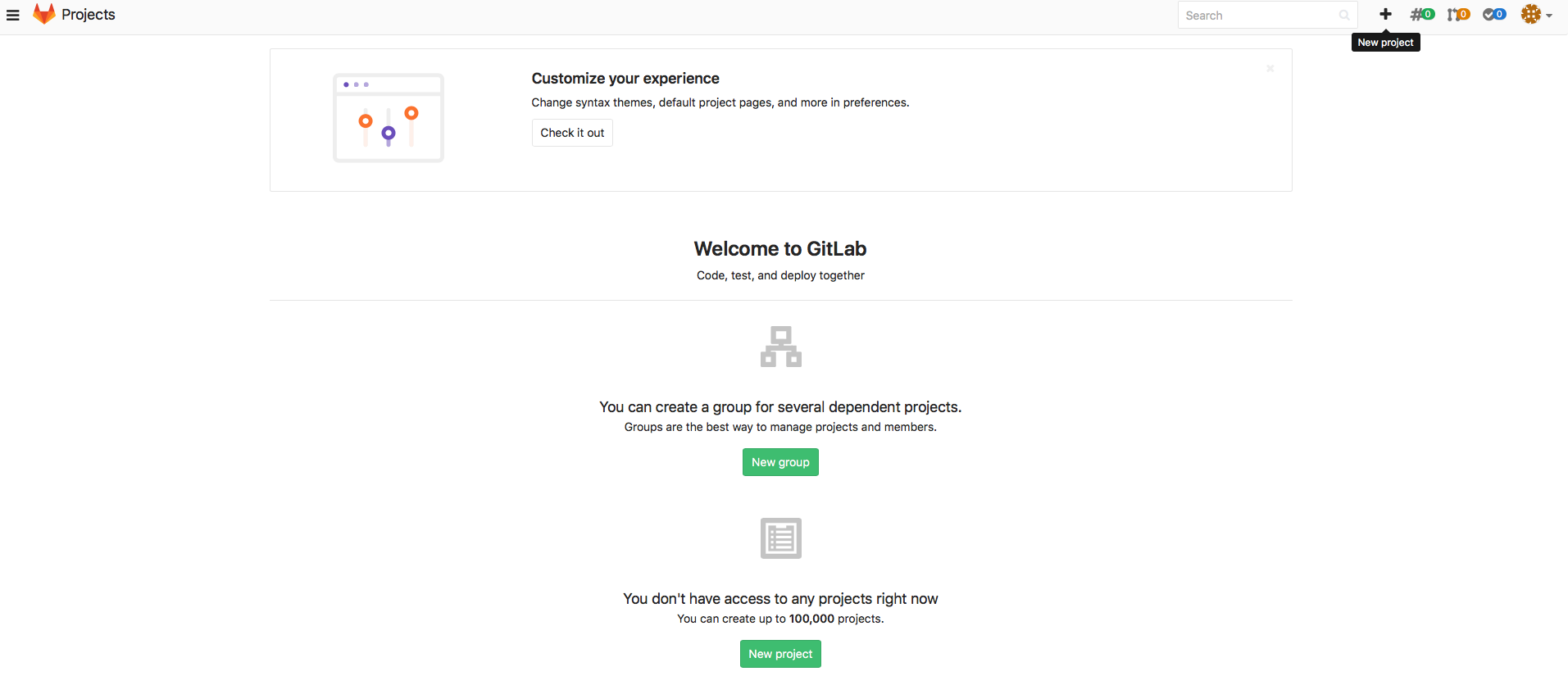
Give a name to your project and click Create project button.
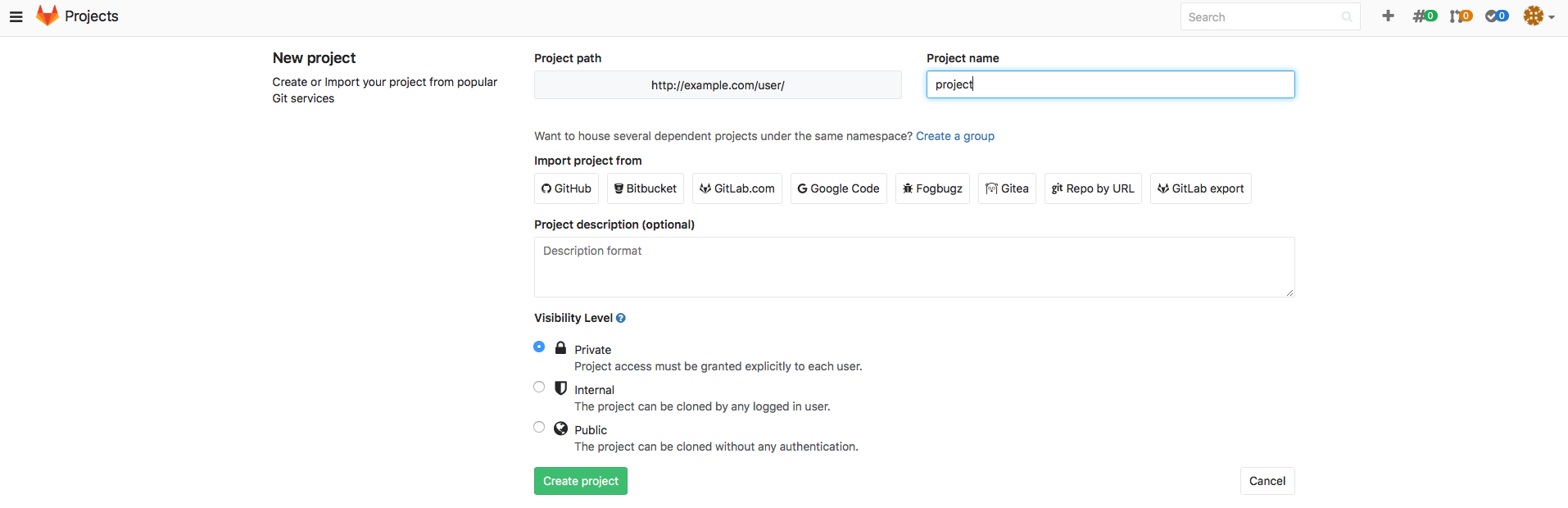
Login to the GitLab server (over ssh or to the local console) and install JRE:
for CentOS 6/7:
$ sudo yum install java
for Debian and Ubuntu:
$ sudo apt-get install default-jre
for OpenSUSE: $ zypper in java
install SubGit binary:
On CentOS and OpenSUSE Linux download universal subgit-3.2.4.zip binary:
https://subgit.com/download/subgit-3.2.4.zip and unzip it: $ unzip subgit-3.2.4.zip
on Debian and Ubuntu download Debian package:
https://subgit.com/download/subgit3.2.4all.deb
fetch missing dependencies and install:
$ sudo dpkg -i subgit3.2.4all.deb $ sudo apt-get install -f
Configure the repository:
Change identity to 'git' user:
su Configure the repository:Change identity to 'git' user:
Code Block language text theme FadeToGrey title change identity to git user $ su git
Change directory to that one that contains the newly created project. GitLab usually stores its project in
No Format /var/opt/gitlab/git-data/repositories/<username>username
here is actual
GitLab user name that was used during the project creation on step 1. Step into that directory:
Code Block language text theme FadeToGrey title change directory $ cd /var/opt/gitlab/git-data/repositories/user
New GitLab project we have created in step 1 is being stored here in the directory of the same name we named the project:
Code Block language text theme FadeToGrey title New project content $ ls -
l
total 0
drwxrwx---. 6 git git 131 apr 25 02:06 project.
git
drwxrwx---. 6 git git 131 apr 25 02:06 project.wiki.git
- Run this command to configure SubGit import
Perform initial import configuration:
No Format $ /temp/subgit-3.2.4/bin/subgit configure --layout auto --trunk
trunk SVNURL GITREPO> To be added into pop-up cloud (when hovering on SVNURL and GITREPO): > > SVN_URL trunk SVNURL GITREPOwhere
- SVN_URL - URL to the SVN project
. > > - GIT_REPO - path to new Git repository where data from the SVN project will be imported to.
see command example --> (to be placed in drop-down block):The configuration command example:
Code Block language text theme FadeToGrey title subgit configure example $ /tmp/subgit-3.2.4/bin/subgit configure --layout auto --trunk trunk http://svn.example.com/svn/repository/project ./project.git SubGit version 3.2.4 ('Bobique') build #3670 Configuring writable Git mirror of remote Subversion repository: Subversion repository URL : http://svn.example.com/svn/repository/project Git repository location : ./project.git Git repository is served by GitLab, hooks will be installed into 'custom_hooks' directory. Detecting peg location... Authentication realm: <http://svn.example.com/:80> Subversion Repository Username [git]: user Password for 'user': Peg location detected: r10248 project/trunk Fetching SVN history... Done. Growing trees... Done. Project origin detected: r1 project/trunk Building branches layouts... Done. Combing beards... Done. Generating SVN to Git mapping... Done. CONFIGURATION SUCCESSFUL To complete SubGit installation do the following: 1) Adjust Subversion to Git branches mapping if necessary: /var/opt/gitlab/git-data/repositories/user/project.git/subgit/config 2) Define at least one Subversion credentials in default SubGit passwd file at: /var/opt/gitlab/git-data/repositories/user/project.git/subgit/passwd OR configure SSH or SSL credentials in the [auth] section of: /var/opt/gitlab/git-data/repositories/user/project.git/subgit/config 3) Optionally, add custom authors mapping to the authors.txt file(s) at: /var/opt/gitlab/git-data/repositories/user/project.git/subgit/authors.txt 4) Run SubGit 'install' command: subgit install ./project.gitExpand title see the configuration command example. $ /tmp/subgit-3.2.4/bin/subgit configure --layout auto --trunk trunk http://svn.example.com/svn/repository/project ./project.gitSubGit version 3.2.4 ('Bobique') build #3670Configuring writable Git mirror of remote Subversion repository:Subversion repository URL : http://svn.example.com/svn/repository/projectGit repository location : ./project.gitGit repository is served by GitLab, hooks will be installed into 'custom_hooks' directory.Detecting peg location...Authentication realm: <http://svn.example.com/:80> Subversion RepositoryUsername [git]: userPassword for 'user':Peg location detected: r10248 project/trunkFetching SVN history... Done.Growing trees... Done.Project origin detected: r1 project/trunkBuilding branches layouts... Done.Combing beards... Done.Generating SVN to Git mapping... Done.CONFIGURATION SUCCESSFULTo complete SubGit installation do the following:1) Adjust Subversion to Git branches mapping if necessary:/var/opt/gitlab/git-data/repositories/user/project.git/subgit/config2) Define at least one Subversion credentials in default SubGit passwd file at:/var/opt/gitlab/git-data/repositories/user/project.git/subgit/passwdOR configure SSH or SSL credentials in the [auth] section of:/var/opt/gitlab/git-data/repositories/user/project.git/subgit/config3) Optionally, add custom authors mapping to the authors.txt file(s) at:/var/opt/gitlab/git-data/repositories/user/project.git/subgit/authors.txt4) Run SubGit 'install' command:subgit install ./project.git
Specify authors mapping
Update GIT_REPOS/subgit/authors.txt file or change core.authors option to point to global authors mapping
Find more details about authors mapping
in Import book
- Perform import and start using new Git repository:
Import data to the repository by the command:
No Format $ /tmp/subgit-3.2.4/bin/subgit import GIT_REPO
Code Block language text theme FadeToGrey title subgit import $ /tmp/subgit-3.2.4/bin/subgit import ./project.git SubGit version 3.2.4 ('Bobique') build #3670 Authentication realm: <http://svn.example.com:80> Subversion Repository Username [git]: user Password for 'user': Translating Subversion revisions to Git commits... Subversion revisions translated: 10248. Total time: 2 hours 15 minutes 38 seconds. IMPORT SUCCESSFULExpand title See import example $ /tmp/subgit-3.2.4/bin/subgit import ./project.gitSubGit version 3.2.4 ('Bobique') build #3670Authentication realm: <http://svn.example.com:80> Subversion RepositoryUsername [git]: userPassword for 'user':Translating Subversion revisions to Git commits...Subversion revisions translated: 10248.Total time: 2 hours 15 minutes 38 seconds.IMPORT SUCCESSFULWhen the command completes, you can clone your new Git repository and start to work with it:
No Format $ git
clone GITREPO WORKTREEclone GITREPO WORKTREEwhere
- WORK_TREE
- path - – path to your working copy.
- GIT_REPO
- GitLab - – GitLab project URL:
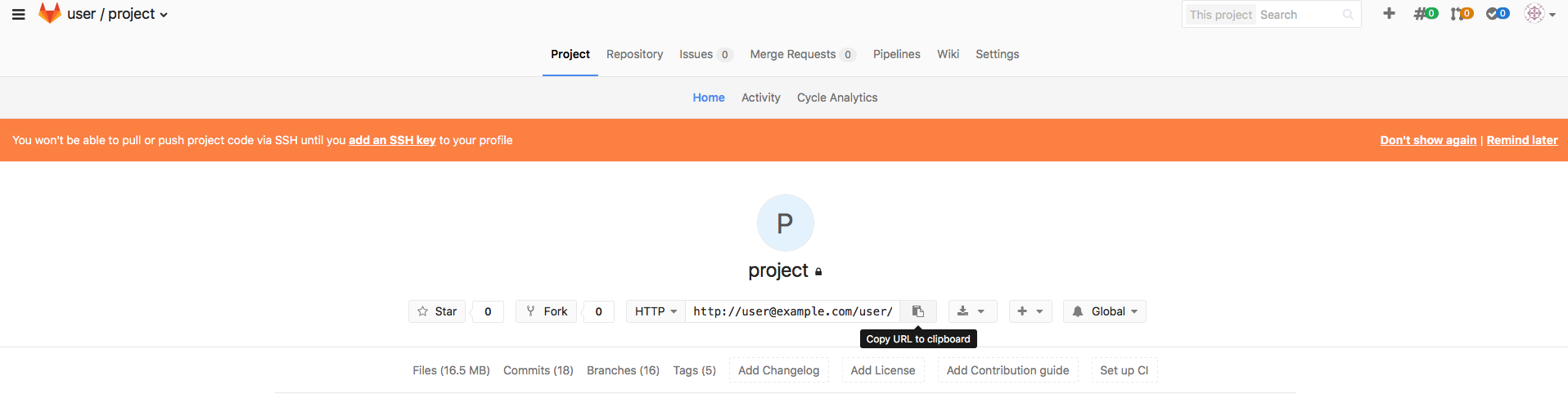
see command example --> (to be placed in drop-down block):Code Block language text theme FadeToGrey title repository cloning example $ git clone http://user@example.com/user/project.git ./project.git Cloning into './project.git'... Password for 'http://user@example.com': remote: Counting objects: 99, done. remote: Compressing objects: 100% (39/39), done. remote: Total 99 (delta 50), reused 99 (delta 50) Unpacking objects: 100% (99/99), done.Expand title See the command example $ git clone http://user@example.com/user/project.git ./project.gitCloning into './project.git'...Password for 'http://user@example.com':remote: Counting objects: 99, done.remote: Compressing objects: 100% (39/39), done.remote: Total 99 (delta 50), reused 99 (delta 50)Unpacking objects: 100% (99/99), done.
see command example --> (to be placed in drop-down block):
| Info | ||
|---|---|---|
| ||
Note: no license key required for import! |
Would you have any assistance, don't hesitate to contact us at support@subgit.com.